Monigear MQTT User Guide
Monigear Device - MQTT data protocol
1. Protocol Introduction
MQTT (Message Queuing Telemetry Transport) is a communication protocol based on the publish/subscribe model. The following diagram shows the typical IoT application system of Monigear series hardware products.
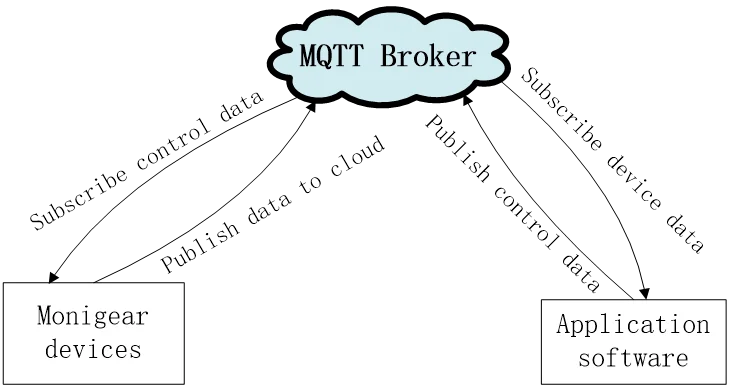
Monigear series products support access to the IoT platforms of major mainstream cloud service providers such as AWS/AZure/Ali (refer to the access documents of each cloud platform), and also support self-built private clouds that connect to standard MQTT interfaces, such as Mosquitto, EMQX and other open-source middleware for communication, allowing users to build their own private IoT cloud systems. This document aims to explain the topics and data formats for device publishing and subscribing when using self-built standard MQTT private IoT clouds. Monigear device data is transmitted based on the MQTT protocol in standard JSON format strings.
2. Communication Example
Using the example of installing and starting EMQX on a Windows system, the Monigear device connects to the MQTT Broker, and the MQTT.fx tool simulates user application software to subscribe/publish data for communication with the device.
Refer to the diagram below for the IoT configuration of the Monigear device. The device supports simultaneous communication and data reporting to 2 IoT centers. The example below uses IoT Center 2 settings:
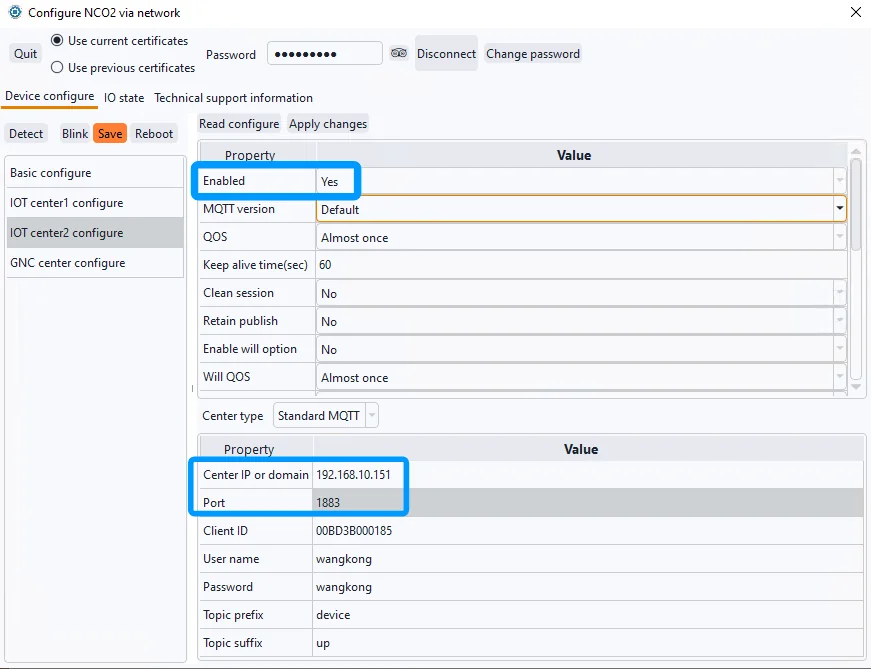
In the MQTT basic settings(the upper part), enable the selection “Yes,” and keep other settings as default. Select “Standard MQTT” for the center type. Enter the IP of the test server which the MQTT broker located, with the default port number 1883. The default Client ID is the device’s MAC address, ensuring uniqueness. The default topic prefix is “device”, and the default suffix is “up”.
The topic for device data reporting is device/${ClientID}/up.
User software can use wildcards to subscribe topic device/+/up to receive data reported by all devices based on the prefix and suffix. The device subscribes to a topic with the control suffix to receive control commands. User software can publish correctly formatted commands to this topic to control the device actions, such as remote relay control.
The topic for receiving control commands is: device/${ClientID}/control
View the current value of the device’s monitoring points:
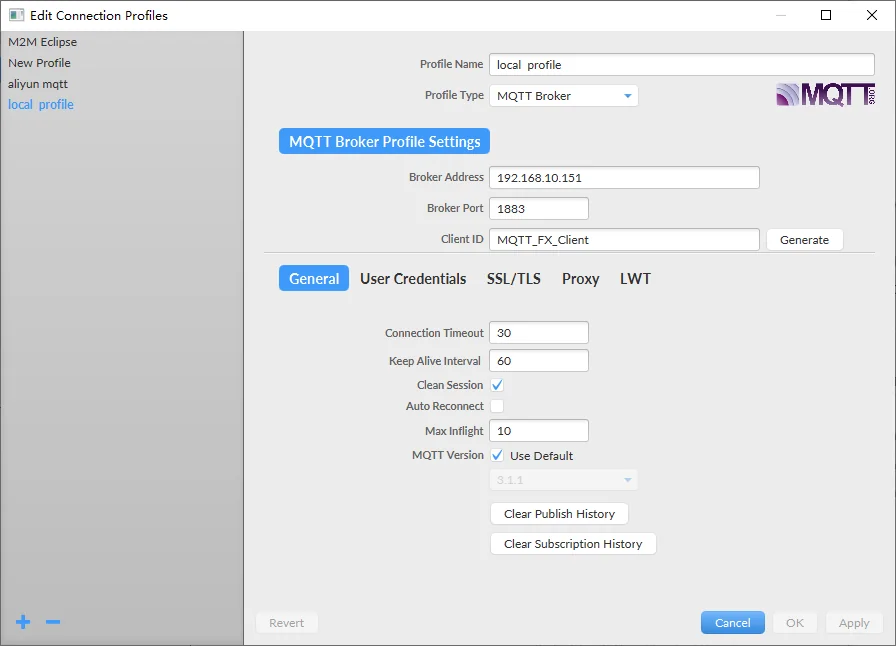
Refer to the following diagram for MQTT.fx connection settings. Enter the IP address and port number of the center, and keep other settings as default.
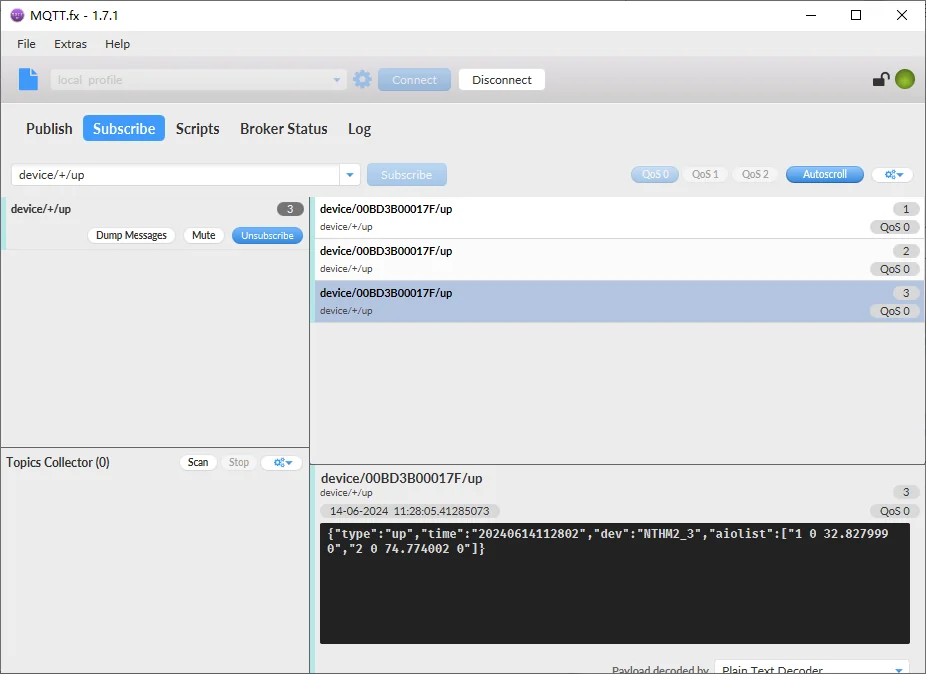
After successfully connecting MQTT.fx, subscribe to device/+/up to receive JSON data published by the device. (Tip: Use the network configuration tool to restart the device. Upon completion, the device will immediately report all data.)
3. Data Collection Reporting
There are two data reporting formats to choose from, “GNC-JSON array” format or “basic JSON” format. The GNC-JSON array format is used in conjunction with our company's data acquisition software to form a large-scale SCADA system. However, based on customer feedback, the new version of the device supports the basic JSON data reporting format to facilitate customers to use third-party software integration.
3.1 Reporting Data Format-”GNC-JSON Array”
Monigear devices represent the status data collected by front-end sensors as monitoring points (SP), divided into four basic types: digital IO value(DIO), analog IO (AIO), enumeration(ENUM), and string value (STR).
| SP type | DIO | AIO | ENUM | STRING |
|---|---|---|---|---|
| Data type | Bool(0/1) | Float | enumeration | string |
| Example | Smoke,leak sensor | Voltage, frequency etc. | AirConditioner working mode | IC card number |
The SP datas are published by the device to MQTT data topic:
| Topic | Description | Publish | Subscribe |
|---|---|---|---|
| device/${ClientID}/up | Device send to MQTT broker | device | Software |
The description of each field in the data content is as follows:
| Parameter | type | Mandator/ optional | Description | |
|---|---|---|---|---|
| type | String | mandatory | For report data should be ”up”。 | |
| time | String | mandatory | Timestamp of reported data in yyyyMMddHHmmss format. | |
| dev | String | mandatory | Device name | |
| diolist | Json array | When there is DIO data to report | Each element is a String composed of the following four parts, separated by spaces, in the format: “ |
|
| dindex | Int | DIO index on the device | ||
| daddr | Int | module address of SP(0 if in main device) | ||
| dvalue | Int | Value(0/1) | ||
| dwlevel | Int | Current warn level(0-3) | ||
| aiolist | Json array | When there is AIO data to report | Each element is a String composed of the following four parts, separated by spaces, in the format: “ |
|
| aindex | Int | AIO index on the device | ||
| aaddr | Int | module address of SP(0 if in main device) | ||
| avalue | Float | Value, float | ||
| awlevel | Int | Current warn level(0-3) | ||
| enumlist | Json array | When there is ENUM data to report | Each element is a String composed of the following four parts, separated by spaces, in the format: “ |
|
| eindex | Int | Enum index on the device | ||
| eaddr | Int | module address of SP(0 if in main device) | ||
| evalue | Int | Value, integer | ||
| ewlevel | Int | Current warn level(0-3) | ||
| strlist | Jsonarray | When there is STR data to report | Each element is a String composed of the following four parts, separated by spaces, in the format: “ |
|
| sindex | Int | String index on the device | ||
| saddr | Int | module address of SP(0 if in main device) | ||
| svalue | String | String, encoded in BASE64 to avoid breaking the characters in the JSON data format | ||
| swlevel | Int | Current warn level(0-3) |
Below is the reporting data of the GNC-X3 host with a temperature and humidity bus module (address 6), where address 0 is the data of the host itself:
| {"type":"up","time":"20240614161414","dev":"GNC-X3","aiolist":["1 0 0.000000 0","2 0 0.000000 0","3 0 0.000000 0","4 0 0.000000 0","5 0 0.000000 0","6 0 0.000000 0","7 0 0.000000 0","8 0 0.000000 0","9 6 31.299999 0","10 6 79.099998 0"],"diolist":["1 0 1 3","2 0 1 0","3 0 1 0","4 0 1 0","5 0 1 0","6 0 1 0","7 0 1 0","8 0 1 0","9 0 0 0","10 0 0 0","11 0 0 0","12 0 0 0"]} |
|---|
3.2 Reporting data format - Basic JSON
The following example uses the data reported by MN-NTHM in basic JSON format to illustrate
| {"type":"up","time":"20250614114509","dev":"NTHM2","A0_1":"86.428398","A0_2":"78.497002"} |
|---|
The data content of type, time, and dev has the same meaning as the JSON array format above. The subsequent JSON elements are the valuesof each supervisory point(SP). The naming rules of the SP are as follows. The first letter represents the type of the SP. There are 4 types : A represents an analog input/oputpu SP, D represents a digital input/output SP, E represents an enumeration SP, and S represents a string SP. Next is the module address of the SP (the number before _), which is 0 for the device itself, and non-zero for a bus module attached in the device. After the symbol "_" is the index value of the SP in the module. The data value of each SP is represented by a string.
Taking the above data as an example: A0_1 represents the first analog input of the device, corresponding to the NTHM (temperature value) of 86.4℉. A0_2 represents the second analog input of the device, corresponding to the NTHM (humidity value) of 78%.
3.3 Trig reporting condition
Monigear devices use event-driven methods to actively report collected data:
Periodic Reporting: The device reports all data once immediately after startup, then periodically reports all data at default intervals of 1200 seconds (20 minutes). The interval can be set accordingly by user.
Note: The data reporting interval setting for new firmware is in the basic settings category, because this parameter affects all protocols that actively report data, including GNC/MQTT/SNMP Trap. For older firmware, this parameter setting was mistakenly placed in the GNC settings category.
Condition Triggered: Data is reported when specified conditions occur (e.g., DIO 0/1 changes or significant changes in analog values). Thus, the length and content of the reported data vary based on needs.
For example, when the temperature and humidity bus module data changes, the host’s reported data is as follows:
| {"type":"up","time":"20240614161545","dev":"GNC-X3","aiolist":["10 6 79.699997 0"]} |
|---|
3.4 Will Data
When the “Enable will option” is enabled, the server publishes a device disconnection message after the device disconnects, with the default topic being device/disconnect. User application software subscribes to this topic and processes corresponding device disconnection events based on the received message content.
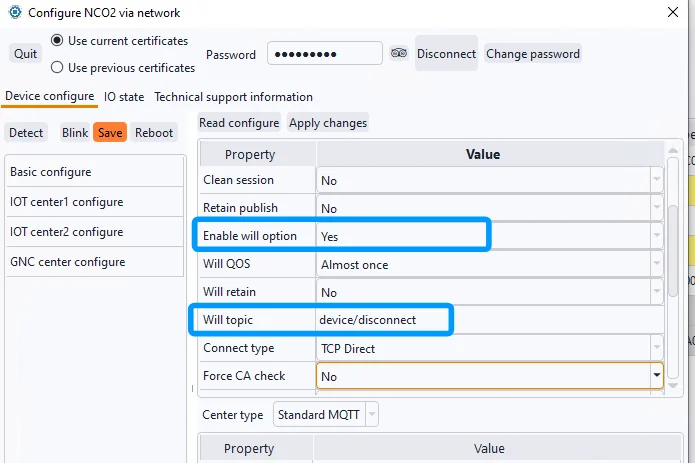
The data content for disconnection is as follows:
| Parameter | Type | Required/ Optional | Description |
|---|---|---|---|
| type | String | Required | Fixed as ”disconnect”。 |
| dev | String | Required | Name of the disconnected device. |
Example:
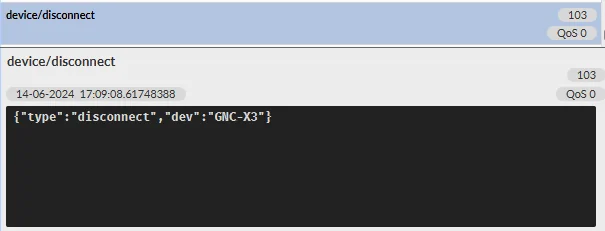
4. Control Command Data Format
Devices subscribe to control command topics to receive control commands published by user application software, enabling remote control of hardware actions or modification of SP data.
| Topic | Description | Publish | Subscribe |
|---|---|---|---|
| device/${ClientID}/ control | User remote control/modify monitoring point | Application software | device |
The data format for control topics must meet the following specifications:
| Parameter | Type | Required/Optional | Description | |
|---|---|---|---|---|
| type | String | Required | Fixed as ”control”。 | |
| dolist | Json array | When control DO | Each element is a String composed of the following three parts, separated by spaces, in the format: “ |
|
| daddr | Int | Module address of DO | ||
| drelindex | Int | Index of the SP within the module (DIO index of Module xxx) | ||
| dvalue | Int | Control value (0/1) | ||
| aolist | Json array | When control AO | Each element is a String composed of the following four parts, separated by spaces, in the format: “ |
|
| aaddr | Int | Module address of AO | ||
| arelindex | Int | Index of the SP within the module (AIO index of Module xxx) | ||
| avalue | Float | float | ||
| enumlist | Json array | When control ENUM | Each element is a String composed of the following four parts, separated by spaces, in the format: “ |
|
| eaddr | Int | Module address of ENUM | ||
| erelindex | Int | Index of the SP within the module (Enum index of Module xxx) | ||
| evalue | Int | Enum value | ||
| strlist | Json array | When control string SP | Each element is a String composed of the following four parts, separated by spaces, in the format: “ |
|
| saddr | Int | Module address of STR | ||
| srelindex | Int | Index of the SP within the module (STR index of Module xxx) | ||
| svalue | String | String value, encoded in BASE64 to avoid characters that would break JSON data format |
Example: Controlling the 3rd relay (DO1) of the MN-NIO controller:
| {"type":"control","device":"NIO8","dolist":["0 11 1"]} |
|---|
“0 11 1” indicates the 11th DIO SP of the NIO (address 0), where 1 means the relay closes, and 0 means the relay opens.
MQTT.fx publish control command example:
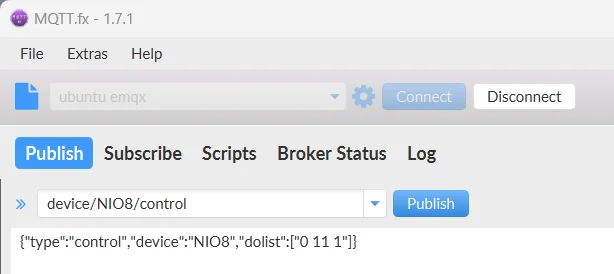
After the control is successful, the device will immediately report the latest SP data to the reported data topic, so that the user can apply the software to feedback the control results in time. Note: If the specified monitoring point is uncontrollable, or the control value is not within the valid range, no action will occur on the device.